

A Claude Code session is one conversation with one job. A terminal opens, the session reads a short file that says what to do, it does the job and it closes itself.
Since early October I have had about 8,700 of them. Half were done in under ten minutes. One in ten ran for more than an hour.
Here is a short one. Two sites I look after had no address for contact form replies. A session opened the settings form in my CMS, filled in each address, reloaded the page to see that it had stayed, wrote one line saying so and closed. Three minutes.
Here is a long one. It ran for about two and a half hours on Niro 3D, my 3D printing shop. Other sessions had finished twelve separate changes. This one merged them, ran the full check (589 tests in the app) and shipped them. Then a tester session found that asking for a password reset too many times crashed the page. It fixed that, shipped again, and sent version 1.0.6 of the phone app to the Android and iPhone test tracks.
I don't read these conversations. There are too many. So the whole setup has one job: each session has to finish on its own and leave behind something I can trust without opening it.
This note is all of it: the steps, the files, what it costs and what went wrong. The small version takes ten minutes to copy.
The small version
One task, one session, one copy of the code. A git worktree gives you the copy.
git worktree add .worktrees/fix-login -b fix-login main
cd .worktrees/fix-login
claude "Read ../../briefs/fix-login.md and carry it out."
Open as many of those as your machine and your usage limit can take. At first I capped mine at five. Now memory is the only limit: the opener starts another session while at least 6 GB would stay free, and it counts 1.2 GB for the new one.
If two sessions need the same file, I run them one after the other. Merge conflicts between agents are expensive, because each side re-reads everything to fix them.
How a job goes from me to the live site
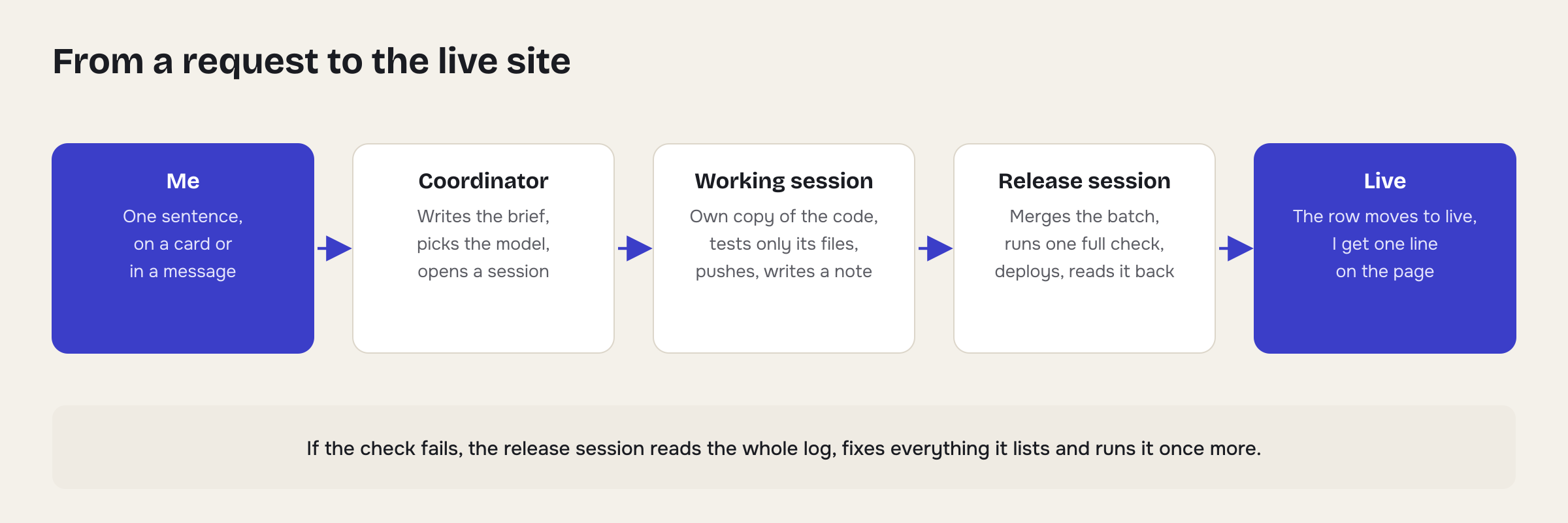
There are three kinds of session. A coordinator plans, reviews and opens the other sessions. I have one for each group of projects. A working session does one task. A release session ships what is ready.
- I ask. Usually one sentence on a card or in a message.
- The coordinator writes the brief. It is a file: the goal, the context, what counts as done, what is out of scope. It splits anything too big.
- The coordinator picks the model. A line at the top of the brief says what kind of work it is. Copy edits, docs and one-file fixes get the smaller model. Features, migrations and anything risky get the bigger one.
- A script opens the session. It makes the worktree, opens a terminal window with the brief, and adds the standard rules at the end. Work that can't start now goes in a queue with a start-by date.
- The session does the task. It runs only the test files it added or changed. It pushes the branch, writes a done note and closes itself.
- A release session starts by itself. The moment a project has finished work, an opener starts one release session for that project, with at most six pieces of work in a batch.
- Cheap checks, then the full one. Formatting, lint and types run first, because 8 of my first 10 release checks failed on exactly those, and each failure cost 20 to 50 minutes. Then one full check runs.
- It merges the exact commit that passed, and deploys. Then it reads back what is really running, instead of trusting the deploy command.
- The row goes live and I get a line. One plain line per change a user can see, in a list of what was released. Moving the row used to wait for someone to do it. The median wait was 3.9 hours. Now it happens in the same step as the deploy.
A release session ships without asking me, unless a visible change has no approved design, a secret is about to go blank, or a database change touches permissions. Then it stops and asks.
The brief is the prompt
Every session starts from a file. Mine look like this:
KIND: feature
REASON: why this needs the bigger model, if it does

Fix the login form: it shows no error on a wrong password.
Change only src/routes/login. No new dependencies.

Done means: the test in login.test.ts fails before and passes after.
Run only that test file. Push the branch. Do not merge.

When finished, write briefs/fix-login.done.md.
Its first line is the whole report in one sentence.
If I can't write it in about ten lines, the task is too big and I split it. The first line of the done note matters more than it looks. My coordinators read hundreds of them, and one line is all they can afford.
Put the facts in the brief, not a pointer to a page. When I measured it, a session taking over from another spent 50 to 87% of its file reading on files the previous one had already read.
Handoffs instead of long sessions
A session gets slower and more expensive as it grows, because every step re-reads the whole conversation. A fresh session of mine costs about 20,000 tokens on its first turn. A hook warns at 200,000 and tells the session to stop at 300,000.
So at around 150,000 tokens a session finishes the step it is on and writes a handoff file with three parts:
- What is done.
- What it learned, as facts with file and line.
- The next steps, in order.
The next session reads only the newest handoff and trusts it. Each handoff is rewritten from scratch, so nobody has to read a chain of them.
I looked at where the first 150,000 tokens went in the sessions that handed off most. On average 27% was reading files, 20% was start-up, 11% was searching and about 11% was everything the session wrote. Thinking took 12 to 31% at maximum effort. At that setting a small model thought about 1,000 tokens per request, against about 90 one step down. So my sessions now run one step below maximum unless a brief gives a reason.
Small things add up. A 1440 px screenshot costs about 8,000 tokens, so agents shrink pictures to 800 px. A turn that reads several whole files at once costs 14,000 to 24,000 tokens, so they find the lines with grep -n and read only that range.
Cards, not chat
I don't read agent chat. When an agent needs me, it posts a card with one decision, in plain words, with the file to open. If a question needs a paragraph of explanation before I can answer it, the agent hasn't finished thinking.
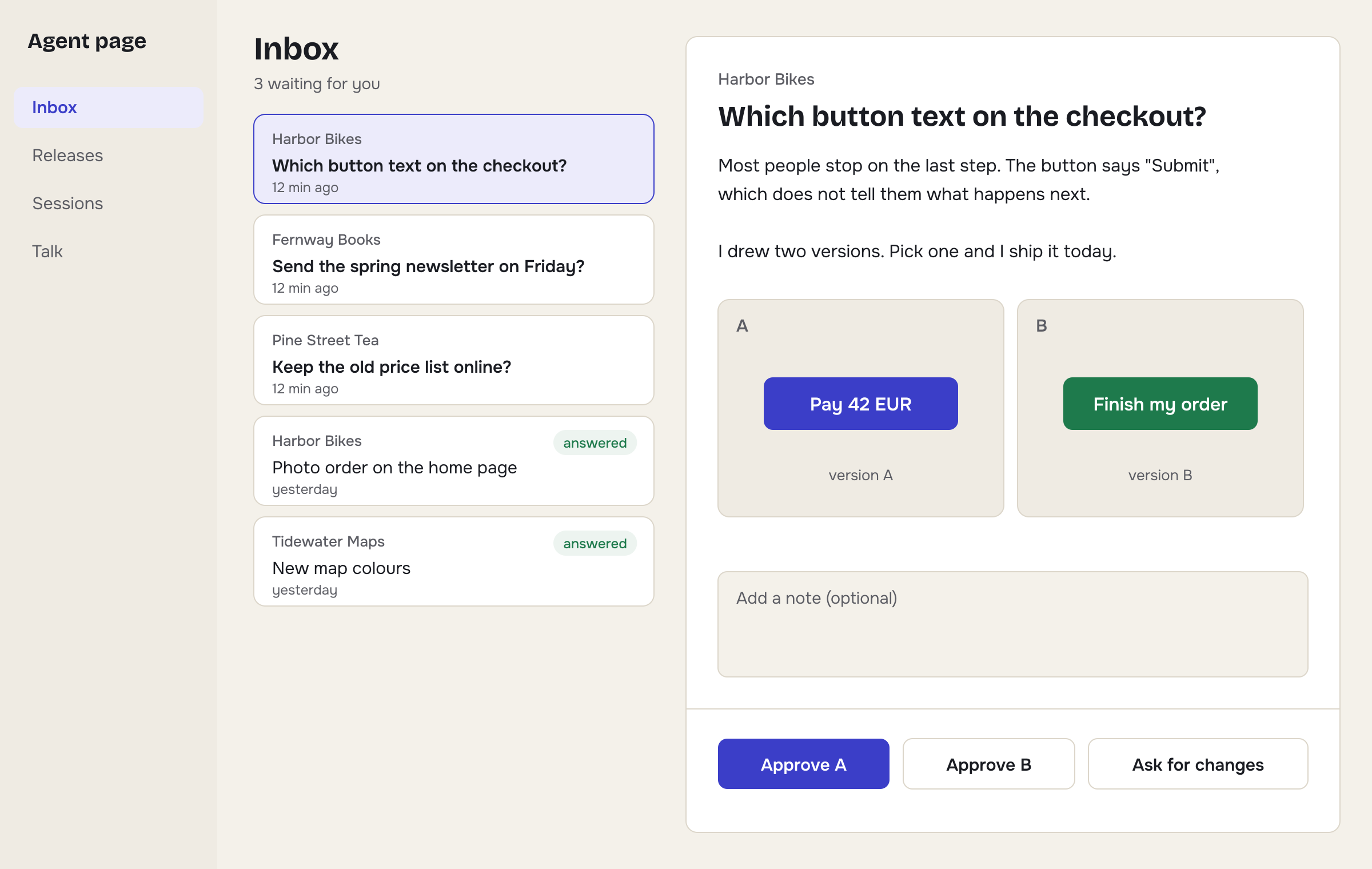
Illustrative screen, sample data
The page is private and it's a small app of my own. It works on my PC and on my phone. This is how a question travels:
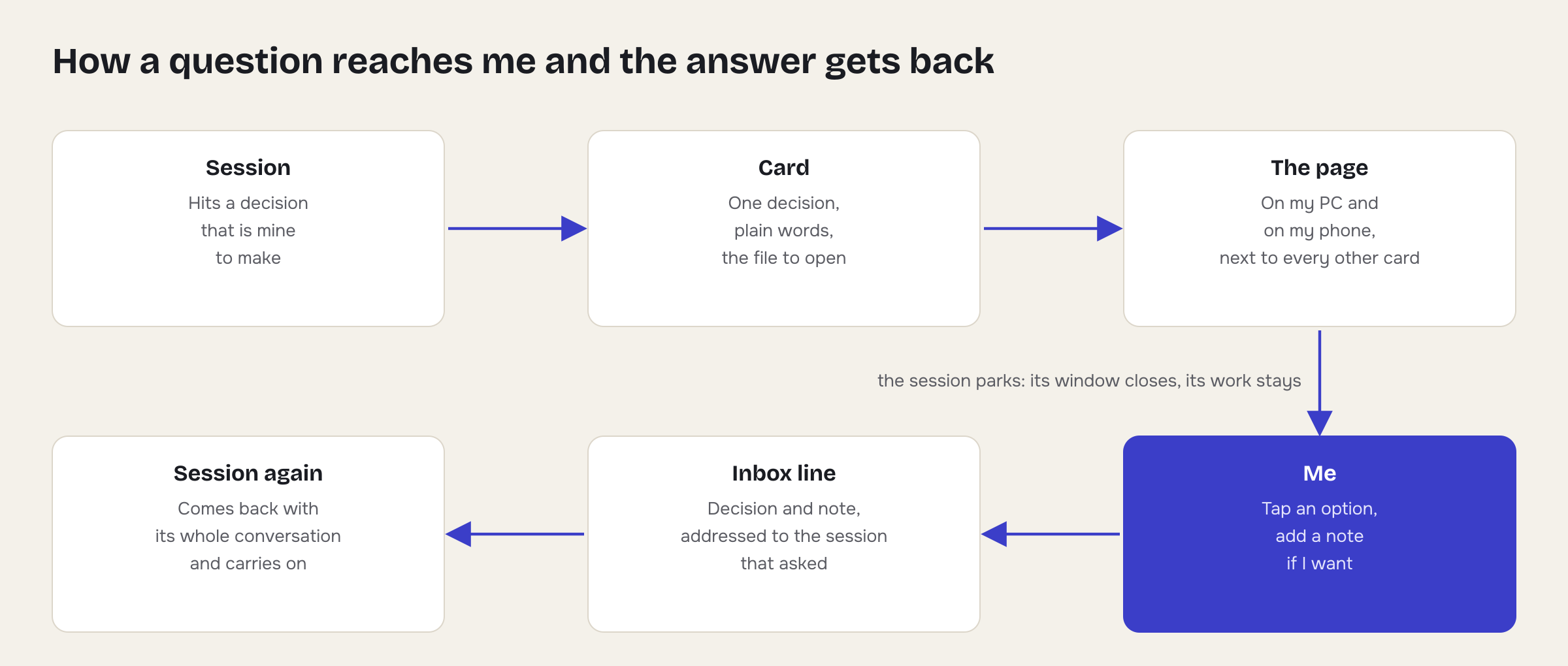
- The session posts the card.
- It parks. Its window closes, but its copy of the code and its conversation stay. It uses no memory while it waits.
- I answer, on either device: pick an option, and add a note if I want.
- The answer becomes one line in an inbox, addressed to the session that asked.
- A timer sees the line and resumes that session with the answer as its next message.
A parked session comes back the same way when its check has finished. If an answer takes more than two hours, or a resume fails three times, its coordinator is told. Nothing fails silently.
The same page has one row for every piece of work, so I can see where things stand without asking anyone.
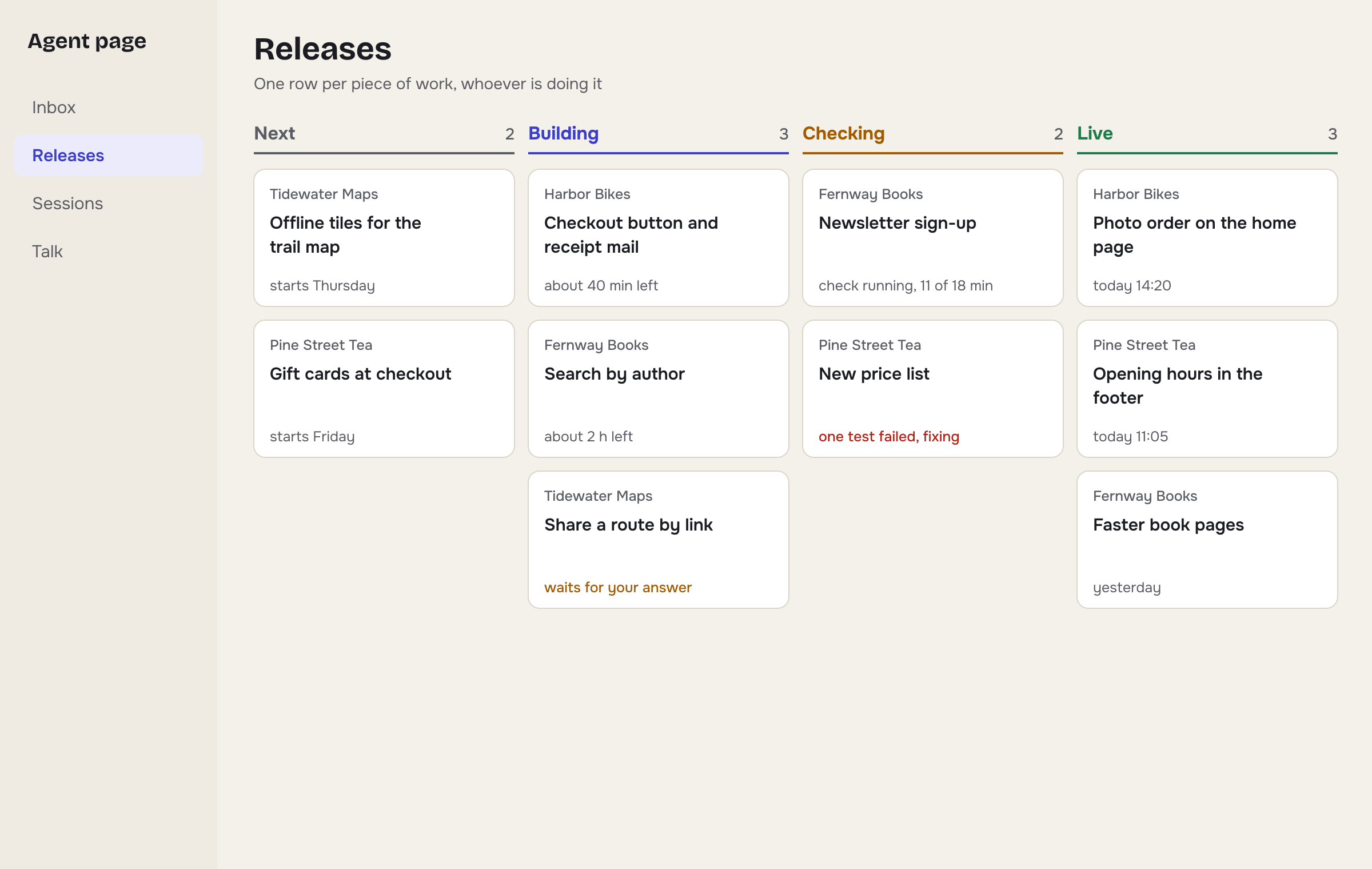
Illustrative screen, sample data
Sessions keep the rows up to date themselves. An hourly job looks for what fell through. A queued row that is late gets a line in its coordinator's inbox, and if it is still late a day later it goes in the digest I read in the morning. If I say yes to something and nobody picks it up within two hours, a new row appears by itself.
Where the windows go
With this many terminals, the desktop becomes its own problem. A dozen windows pile up on one workspace, and a session that has finished looks exactly like one that is still working. You have to click through all of them to find out.
I run Omarchy, which is Linux with the Hyprland window manager. So I wrote a small tool for it called wingroup. It's open source.
git clone https://github.com/niro58/omarchy-wingroup.git
cd omarchy-wingroup
./install.sh
hyprctl reload && pkill -SIGUSR2 waybar
The installer edits your waybar and Hyprland config, and copies each file to a backup first.
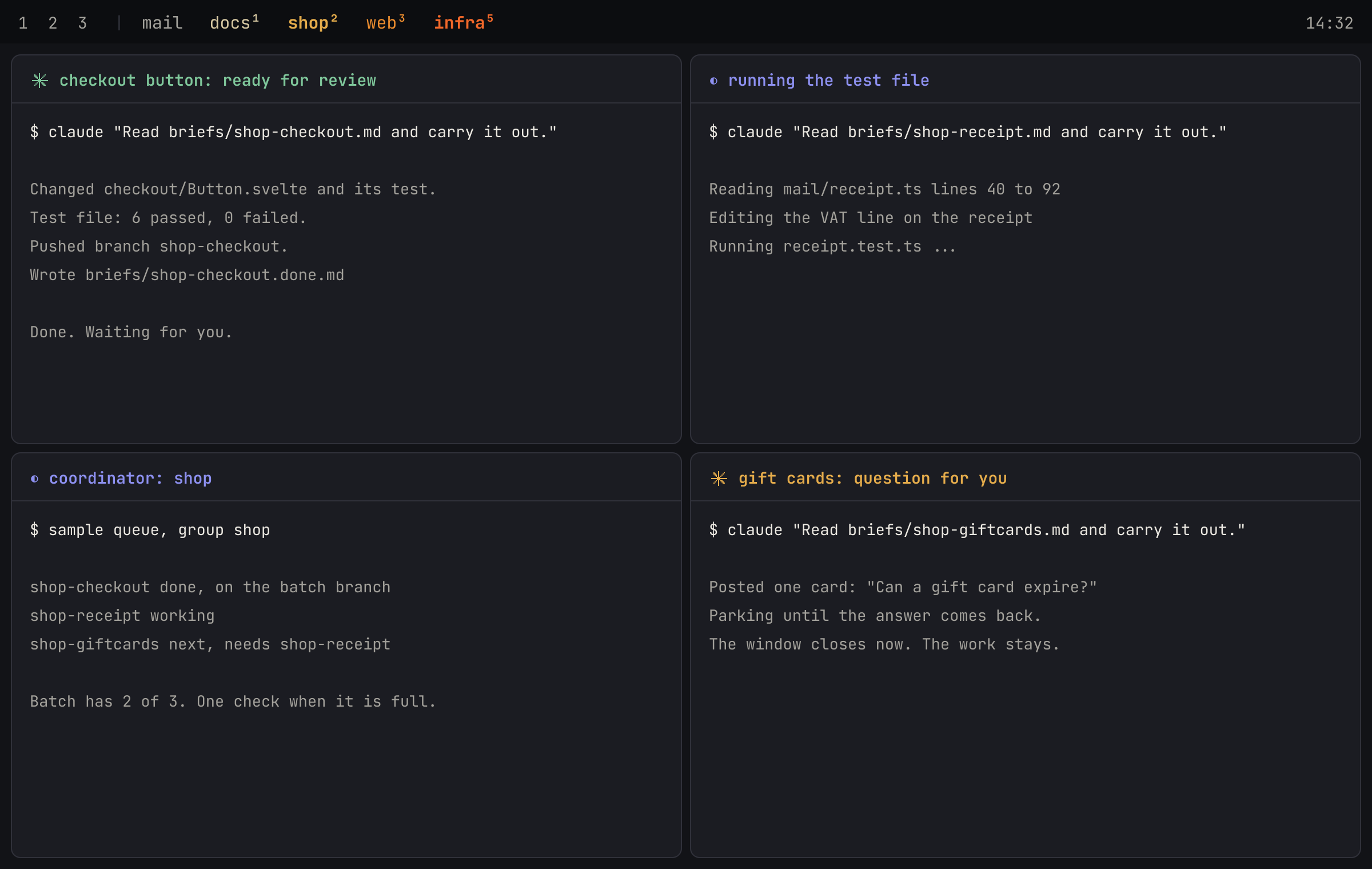
Illustrative screen, sample data
A group is a named workspace that owns some project folders. Open a terminal inside one of those folders and the window goes to that group by itself. My session opener also files each new window by project family, so the windows sort themselves while I do something else.
The bar along the top has one button per group. The small number on a button is how many sessions in that group are done and waiting. The tool knows this from the window title, because Claude Code puts ✳ at the start when it's idle and a spinning ◐ when it's busy. The colour gets stronger as the number goes up, so I can see from across the room which group has work piling up.
SUPER+G opens a picker with every group and window. SUPER+CTRL+G sends the current window to a group.
Two things broke, and both are fixed now:
- The system killed terminals when memory ran out. The window just disappears, with no message. Now the group that lost a session is marked on the bar, and
wingroup crashedrelaunches each lost session in its folder and resumes the conversation where it can. - Closing the laptop killed work. I lost 27% of my big design runs to the lid or to a sleep timer. Now every session runs under an inhibitor, so the machine can't sleep while one is alive:
systemd-inhibit --what=sleep:idle:handle-lid-switch --why="agent session" claude
Checks: the part I got most wrong
At first every agent ran the whole test suite after every small change. At the worst point my two small test clusters were taking about 240 runs a day and everyone was queueing.
The rule now:
- A session runs only the test files it added or changed, on my PC.
- Finished branches collect on one integration branch, and one full check covers the batch.
- At most two checks run per project at the same time.
- A check must not stop at its first failure. Once it took seven runs in a row to find the failures one by one. Now one run lists them all, and the agent fixes all of them before running again.
Hooks worth having
A hook is a script Claude Code runs at a fixed moment. Exit code 2 from a PreToolUse hook refuses the action and shows the agent your message. Here is a small one you can copy.
{
  "hooks": {
    "PreToolUse": [
      {
        "matcher": "Bash",
        "hooks": [
          { "type": "command", "command": "python3 ~/.claude/hooks/block-push-to-main.py" }
        ]
      }
    ]
  }
}
import json
import re
import sys

event = json.load(sys.stdin)
command = event.get("tool_input", {}).get("command", "")

if re.search(r"\bgit\s+push\b.*\b(main|master)\b", command):
    print("Do not push to main. Push your branch and report.", file=sys.stderr)
    sys.exit(2)
This catches mistakes, not a determined attacker. It's a seatbelt. The ones that earned their place for me:
- Block pushes to the main branch.
- Warn when a command would print more than 200 lines.
- Warn on context size, as above.
- Tell my page what a session is doing. A small script runs on six Claude Code events and posts one line: started, busy, idle, waiting on me or closed.
What it costs
These are list prices per finished session, recorded when each session closes. They are for comparing, not a bill.
| Model | Sessions | Median per finished session |
|---|---|---|
| Opus | 2,999 | $7.77 |
| Sonnet | 3,902 | $1.32 |
| Sonnet, effort capped | 1,271 | $2.27 |
The third row is the lesson. In the first weeks, Sonnet at maximum effort cost a median of $32.86 per session. In one measurement, 76% of that bill was re-reading long conversations, not writing anything, and no setting was measurably better than another. After I capped effort and shortened sessions, the same tier dropped to $2.27.
My rule now is one question: is there judgement in this task? If yes, Opus. If no, Sonnet.
What went wrong
Most of the rules above came from something like this:
- A wait loop looked only for the word "passed". The run had failed, so it sat for an hour.
- A loop waited with
pgrep -f, which matched its own command line and never ended. Three hours. - A loop waited for a run to appear in a status list. Finished runs drop off that list. Five hours.
- A session waited for a file to disappear. Nothing ever deleted that file. An hour and fifty minutes.
- Two sessions reported an empty table because they had read the wrong database.
- Early on I burned through two 5-hour usage limits in one day.
Four of those are the same mistake. Writing a rule down doesn't stop it happening again in a new shape. It does mean the next one gets fixed in a minute. Now every wait reads an explicit result line and treats anything except "passed" as not green.
If I started again
Worktrees and written briefs on day one. Then the done note. Then the handoff. I'd leave the page for last. It's the most fun to build and the least useful until the rest works.